
Cet article est aussi disponible en français
This article was written over four years ago, then updated on 15/10/2026.
Following a discussion with Clément (@shikiryu) about putting composer.lock under version control (or "versioning" it), I asked the question on Twitter:
Petite discussion avec @shikiryu, on est d'accord : le composer.lock on le commit hein ? #PHP
Kevin Gautreau (@Kgaut), January 3, 2017
For a website or a web application (for a library, it's a different story), to me the question didn't even arise:
- The composer.json file contains the list of dependencies our project needs, this file must be versioned.
- The vendor folder contains the sources of these dependencies, this folder must not be versioned.
- The composer.lock file contains the exact state (the version) of our dependencies at the time we work on the project, to me it must be versioned.
How does Composer work?
To understand how Composer works, we are going to use a new silex project (a micro-framework built on Symfony components).
To do this, I go into an empty folder and run the following command in a terminal:
composer require silex/silex
Since the folder is empty, there is no composer.json file listing my project's dependencies, so this file is created by the composer require command. Here is its content:
{
    "require": {
        "silex/silex": "^2.0"
    }
}
Once this file is created, Composer automatically runs the composer install command to install the dependencies. "Composer install" starts by checking whether a composer.lock file exists, which contains the exact version of the dependencies to use. In our case it doesn't exist, so it creates it using the composer.json file.
In our case the file is quite simple: it says it only needs the silex/silex library in a version above 2.0 (we could just as well require a specific version of silex with the following line: "silex/silex": "2.0.1").
Composer then queries packagist.org (Composer's default repository, a sort of directory of all installable libraries) to find the most recent version of our package that matches our constraints.
Note that Packagist can also be browsed "manually"; for example, here is the page for silex: https://packagist.org/packages/silex/silex.
At the time of writing, the most recent version of silex is 2.0.4, so that's the one Composer fetches and installs.
Once silex is downloaded and installed, Composer records its exact version number in the composer.lock file.
If we inspect it, we do find the section defining silex/silex:
"name": "silex/silex",
"version": "v2.0.4",
"source": {
    "type": "git",
    "url": "https://github.com/silexphp/Silex.git",
    "reference": "49ca08d853731d1635374e5019c8696cfd53c161"
},
But the file is much longer than that and contains references to other libraries, for example pimple/pimple, which we didn't ask for.
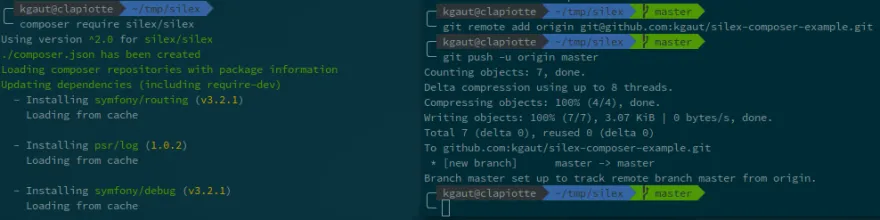
Silex itself needs third-party libraries, as we can see during the "composer require":
composer require silex/silex
Using version ^2.0 for silex/silex
./composer.json has been created
Loading composer repositories with package information
Updating dependencies (including require-dev)
  - Installing symfony/routing (v3.2.1)
    Loading from cache

  - Installing psr/log (1.0.2)
    Loading from cache

  - Installing symfony/debug (v3.2.1)
    Loading from cache

  - Installing symfony/polyfill-mbstring (v1.3.0)
    Loading from cache
...
And the versions of these dependencies are also recorded in the composer.lock file.
Here is now the structure of our project:
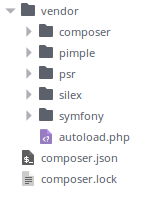
We are now going to create an "app" folder that will hold our custom code (here a simple index.php file):
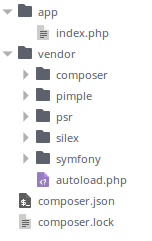
We are now going to use git to version all this, but what exactly should be versioned?
- The app folder: yes, because it can't be found anywhere else
- The vendor folder: no, it's pointless, because it is generated automatically by Composer
- The composer.json file: yes, it contains the list of required dependencies.
- The composer.lock file: to me yes, because it contains the exact version of the dependencies in use.
The .gitignore file is used to keep the vendor folder out of version control. Here is its content:
/vendor
Note that the gitignore file must be versioned too.
Installing the project on someone else's machine
Now, if someone wants to install my application on their system, they just need to clone my repository and install the dependencies with composer install:
git clone git@github.com:kgaut/silex-composer-example.git
cd silex-composer-example
composer install
Unlike when we ran "composer require", composer.lock now exists, so Composer knows exactly which version to fetch for each dependency.
Without a composer.lock file, Composer would have queried Packagist for the most recent version of our dependencies, and that other person could have ended up with a newer version than the one we had during development. In most cases this wouldn't have been a problem, but we're never safe from a buggy new release of a dependency of one of our dependencies.
On the buggy dependency point, some people objected that we shouldn't use a "flaky" dependency, but come on, shipping a buggy release happens to everyone; I'm not going to do without a dependency because one of its releases had a bug...
Others told me that unit tests are there for that. To me, no: they're not meant to test every feature of our dependencies.
Handling updates
To update our dependencies, we use the "composer update" command to update everything, or "composer update dependency" to update a single dependency.
In that case, Composer reads the composer.json file to recall the version constraints we set, queries packagist.org, and if it finds new versions, updates the composer.lock file with the new information. It then automatically runs the "composer install" command to download these new versions.
Conclusion
When developing a library (a dependency), the question doesn't arise: the composer.lock file must not be versioned, and if you need a dependency in a very specific version, you have to specify it in the composer.json file.
On the other hand, when developing a web application or a website, I don't see the point of not versioning the composer.lock file; to me it can only cause problems. And that's what the Composer website confirms:
Commit your application's
composer.lock(along withcomposer.json) into version control.https://getcomposer.org/doc/01-basic-usage.md#composer-lock-the-lock-fi…
Yet in the Twitter poll (which is worth no more than any poll), nearly a third of voters were against committing composer.lock... I'd really like to understand why; maybe I'm missing something? But for now I don't see it.

Written by Kevin Gautreau — freelance PHP/Drupal developer & trainer in Auvergne, France. get in touch
Comments (8)
Comments
Je suis d'accord avec toi. Pour un projet il faut commit le composer.lock car c'est la seule garantie que, lors du build d'un des environnements, il soit ISO avec les autres du côté des dépendances.
Sans ce fichier, si une librairie à été mis à jour entre le moment où tu as build ton environnement de tests et celui où tu as build ton environnement de production, tu peux aller au devant de surprises.
Je versionne aussi, je prefere que le composer install soit predictible (et doncidentique ) a chaque fois.
Pour avoir connu cette situation, la question pourrait aussi etre posée ainsi : qui est censé commiter le composer.lock ? Chaque développeur ? Uniquement le responsable intégration / devops ?
Le composer.lock "ne sert que" à garantir le déploiement d'une version précise de l'application à un instant T.
Cette question est plutot superflue pour un dev qui doit implémenter une nouvelle fonctionnalité (par exemple dans sa branche feature)
Par contre, elle devient indispensable au moment de la livraison de l'appli.
Je tombe sur ce post suite à une recherche (indirecte) sur des lenteurs lors de déploiements avec l'utilisation de composer.
J'ajouterais donc à ton billet, que le fait d'inclure composer.lock dans ton dépôt évite une charge mémoire importante sur le serveur. Le projet que nous développons est de plus en plus important et à chaque déploiement, le temps est de plus en plus long à cause de l'écriture de ce fichier.lock
Source Reddit.com
c'est utile merci
attention, dans la conclusion " je ne vois pas l'intérêt de ne pas versionner le fichier composer.json" alors que l'on parle ici du composer.lock
Sinon super artcile
Merci ! C'est corrigé !
merci infiniment pour ces explications, c'était clair net et précis, j'ai enfin compris le fonctionnement de composer, merci merci merci