
Cet article est aussi disponible en français
I've been working on decoupled Drupal projects for a few years now (Drupal as the back end for content editing, with an Angular front end or a mobile app, for example); in those cases you can use JSON:API or custom endpoints. Since Single-Directory Components (SDC) landed in core, I write my components like any other front-end component: typed props (a title, an image URL, a width, a list…) and slots for rich HTML. The problem is that Drupal only knows how to hand out HTML. An image field reaches the template as a render array, ready to produce an <img> tag, not as a URL. And you end up writing preprocess functions to fetch the file URL, apply the image style, check access on the media, put the right cache tags back…
The same problem is even more acute when Drupal doesn't render anything at all: a decoupled front end (Angular, React, a mobile app) expects clean JSON, not render arrays or field machine names. And as we all know, Drupal is verbose about content structure... Hard to get a simple, clear API contract.
To simplify all this, I ended up writing a module: Raw Fields Formatters. It provides field formatters that produce no markup at all, only typed values, gathered in a data array. That array works just as well as props for an SDC component as it does as a JSON response for a decoupled front end.
How it works
In "Manage display", you pick a raw_* formatter for each field you want to expose. The entity template then receives a data variable:
{{ data.title }}
{{ data.image.url }}
Nothing else to write. A single value is unwrapped, multiple values give a list, and an empty field is NULL.
Values are typed: a boolean is a real true, an integer a real int. Richer fields come out as arrays:
// Raw Image URL: dimensions follow the selected image style.
['url' => 'https://…/image.webp', 'alt' => 'Un chat', 'title' => '', 'width' => 600, 'height' => 400]

// Raw URL
['url' => '/blog/un-titre', 'uri' => 'entity:node/12', 'title' => 'Lire la suite', 'external' => FALSE]

// Raw Formatted Text: the text format is applied, "plain" is the text without tags.
['value' => '<p>Du texte</p>', 'plain' => 'Du texte', 'format' => 'basic_html']
The available formatters cover the common field types: plain text, formatted text, boolean, integer, decimal, list, link, image, file, entity reference, paragraphs, and two contrib types (UI Icons icon, and Geolocation). Entity references and paragraphs nest the target entity's data, built from the view mode selected in the formatter.
data.title, not data.field_title
To me, this is the real point of the module. Each formatter has an Override the default key with setting that renames the key in data. So you no longer deal with Drupal machine names (field_titre, field_uzp_gallery, field_media_image…) but with the names used by the component or the API contract: title, images, image.
| Field | Key | In data |
|---|---|---|
field_titre | title | data.title |
field_visuel | image | data.image.url |
field_uzp_gallery | images | data.images |
What this changes:
- The template or the front end no longer knows about the Drupal data model. A
cardcomponent expectstitle,image,link, whatever content type feeds it: an article withfield_titreand a page withfield_headingproduce the same structure, and the component works for both; - The contract survives redesigns: renaming or replacing a field on the Drupal side breaks neither the templates nor the front-end app, you just move the key to the new field in "Manage display";
- The contract can be read in the back office: each formatter's summary shows the exposed key. The view mode decides what comes out and under which name.
The second common setting, Force as array, stabilizes the shape: it always returns a list, even with a single value. Without it, a node with a single tag gives a string, and the template's {% for tag in tags %} (or Angular's @for) loops over the characters.
Installation
composer require drupal/raw_fields_formatters
drush en raw_fields_formatters
The module only depends on core: Drupal 11 (PHP 8.3) or Drupal 12 (PHP 8.5). Each formatter only shows up if the module providing its field type is present.
On Drupal 12, the "text with summary" field type (text_with_summary) has left core: it now comes from the contrib module Text With Summary, which you need to install to keep Raw Formatted Text on those fields.
First use case: feeding SDC components
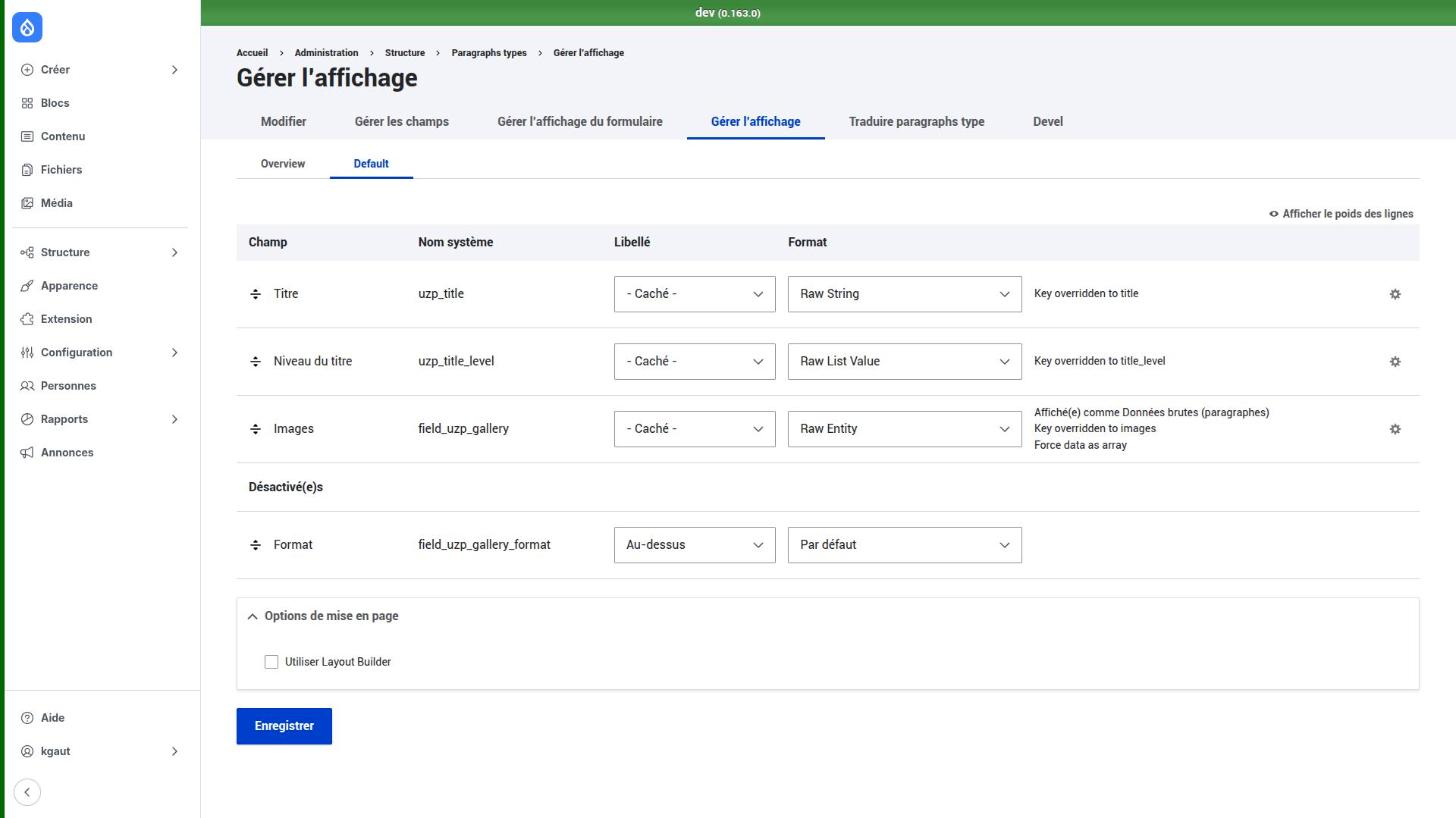
On my uzinasit infrastructure, every content building block is a paragraph rendered by an SDC component. Take the gallery: a title, a heading level and a list of image media.
In the paragraph's "Manage display", each field gets its raw formatter and a key matching the prop name. The media field uses Raw Entity, with Force as array (a gallery with a single image is still a list) and a dedicated media view mode, "Données brutes (paragraphes)" (raw data for paragraphs):
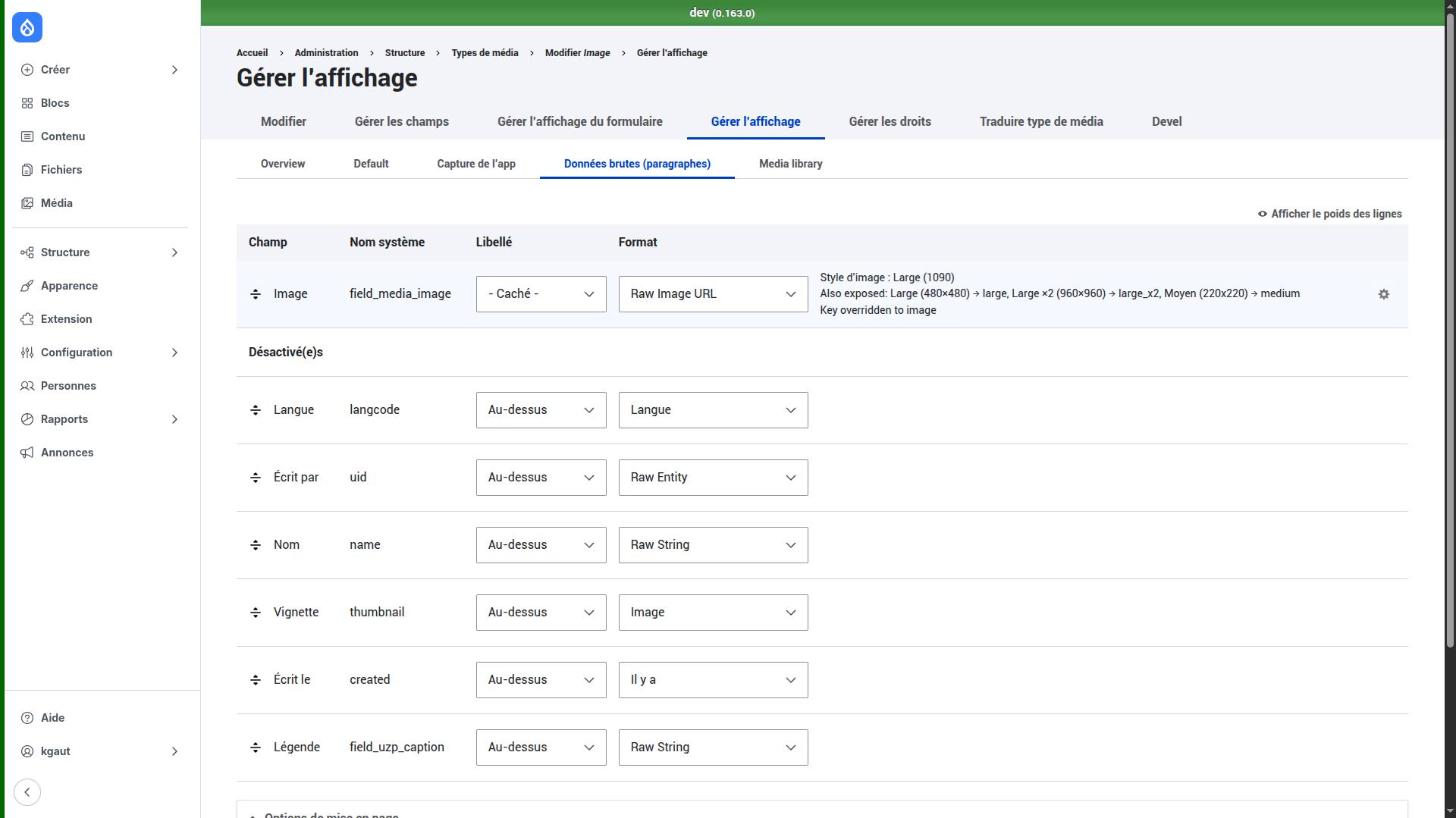
On the media side, this view mode exposes a single field: the image, with Raw Image URL. The formatter can expose several image styles at once: a main style, plus extra styles, each checked and exposed under its own key.
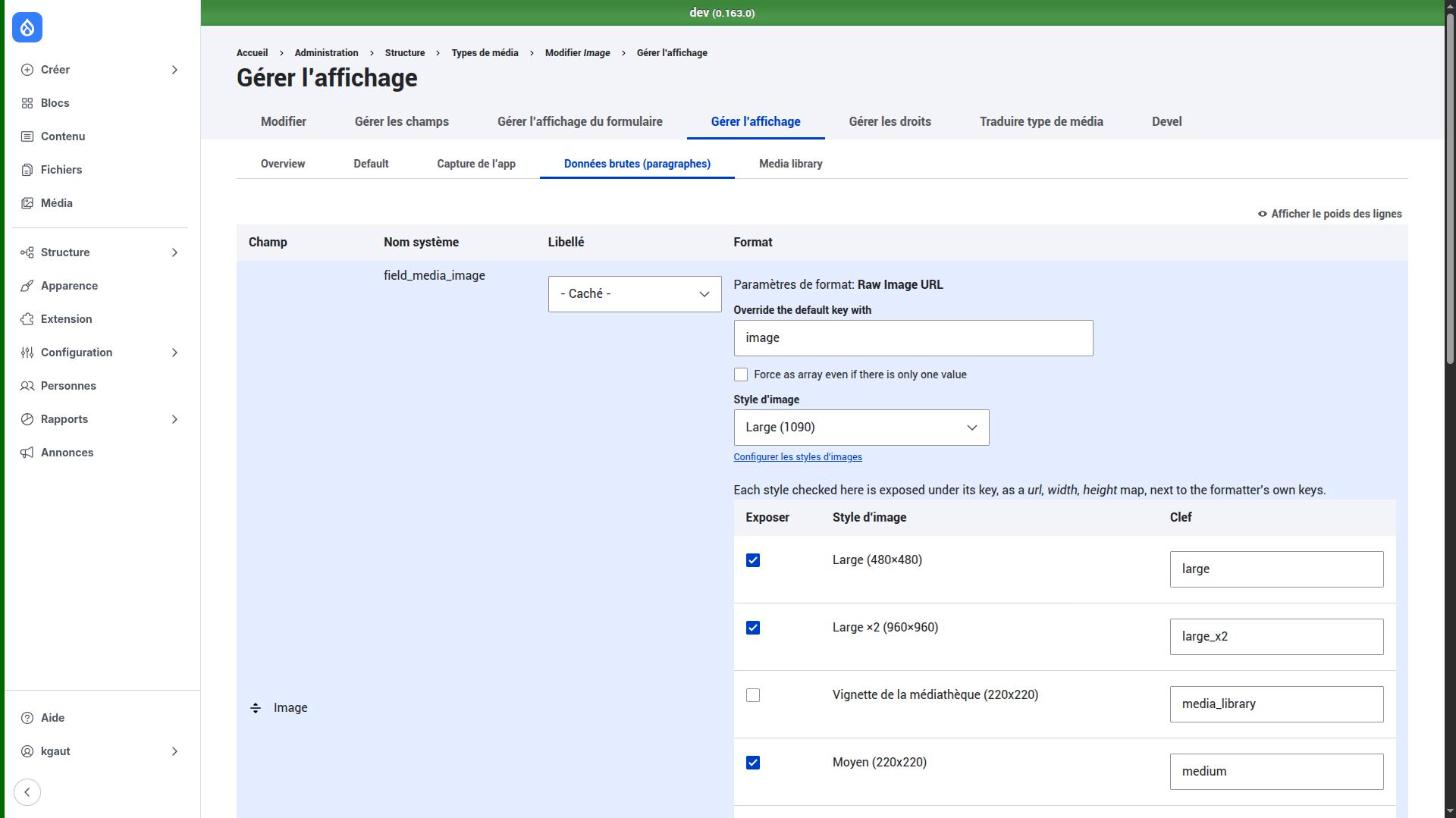
With a main style "Large (1090)" and three extra styles (Large 480×480, Large ×2 960×960 and Medium 220×220), each gallery image arrives in data.images in this form:
[
  'url' => 'https://…/styles/large_1090/…',
  'alt' => '…',
  'width' => …,
  'height' => …,
  'large' => ['url' => '…', 'width' => …, 'height' => …],
  'large_x2' => ['url' => '…', 'width' => …, 'height' => …],
  'medium' => ['url' => '…', 'width' => …, 'height' => …],
]
Widths and heights are the ones the image style computes for each file. Each extra style is a url / width / height array, never a bare URL: dimensions must travel with the URL they belong to.
The paragraph template: mapping, not rendering
The paragraph template renders no fields at all. It simply maps data to the component's props:
{# paragraph--uzp-gallery.html.twig #}
{% set title %}
  {%- if data.title -%}
    {{ include('uzinasit_paragraphs:heading', {
      text: data.title,
      level: data.title_level|default(2),
    }, with_context: false) }}
  {%- endif -%}
{% endset %}
{{ include('uzinasit_paragraphs:gallery', {
  attributes: attributes.addClass(classes),
  images: data.images|default([]),
  title: title|trim ? title : '',
}, with_context: false) }}
The component: a srcset without preprocess
The component, for its part, knows nothing about Drupal. It receives a list of images and uses the large style for the thumbnail, large_x2 as the second srcset candidate, and the main image for the link:
{# components/gallery/gallery.twig (excerpt) #}
{% for image in images %}
  {% set thumbnail = image.large.url is defined ? image.large : image %}
  <li class="uzp-gallery__item">
    <a class="uzp-gallery__link" href="{{ image.url }}">
      <img
        src="{{ thumbnail.url }}"
        {%- if image.large_x2.url is defined and image.large_x2.width > thumbnail.width %}
          srcset="{{ thumbnail.url }} {{ thumbnail.width }}w, {{ image.large_x2.url }} {{ image.large_x2.width }}w"
          sizes="(min-width: 60em) 18rem, (min-width: 30em) 33vw, 50vw"
        {%- endif %}
        alt="{{ image.alt|default('') }}"
        width="{{ thumbnail.width }}" height="{{ thumbnail.height }}"
        loading="lazy" decoding="async">
    </a>
  </li>
{% endfor %}
The widths are the ones computed by the image style: the srcset is accurate, without a single line of PHP. And the day a site needs another size, you just check a style in the back office.
Enriching data in a preprocess
The module doesn't replace preprocess functions, it makes them lighter. In the gallery, each image displays its media caption, in the paragraph's language: that's not a field from the display, it's computed data. So the preprocess adds to data.images:
#[Hook('preprocess_paragraph')]
public function preprocessParagraph(array &$variables): void {
  // ...
  if (!isset($variables['data']) || !is_array($variables['data'])) {
    $this->rawRenderer->renderData($variables);
  }
  if ($paragraph instanceof GalleryParagraph && is_array($variables['data']['images'] ?? NULL)) {
    $variables['data']['images'] = $this->withCaptions($paragraph, $variables['data']['images']);
  }
}

private function withCaptions(GalleryParagraph $paragraph, array $images): array {
  $items = $paragraph->get(GalleryParagraph::FIELD_GALLERY);
  $langcode = $paragraph->language()->getId();
  foreach ($images as $delta => $image) {
    $media = $items->get($delta)?->get('entity')->getValue();
    if (!$media instanceof ContentEntityInterface) {
      continue;
    }
    $translation = $this->entityRepository->getTranslationFromContext($media, $langcode);
    $caption = GalleryParagraph::caption($translation);
    if ($caption !== '') {
      $images[$delta]['caption'] = $caption;
    }
  }
  return $images;
}
Testing whether a value is present
With raw values, you test what is actually there, instead of wondering whether some render output is empty. The "Block and image" building block falls back to a simple grid of blocks when its image is missing (deleted media, access denied):
{% if data.image.url is defined and data.image.url %}
  {{ include('uzinasit_paragraphs:block-image', {
    image: data.image,
    block_position: data.block_position|default('left'),
    title: title|trim ? title : '',
    block: blocks|default([]),
  }, with_context: false) }}
{% elseif data.blocks_count|default(0) > 0 %}
  {{ include('uzinasit_paragraphs:blocks', { ... }, with_context: false) }}
{% endif %}
Props and slots side by side
A display doesn't have to be entirely raw. A field on a raw_* formatter becomes a prop in data; a field left on a regular formatter remains available in content, ready to be passed as a slot. That's the model I recommend: structured values as props, rich HTML (a WYSIWYG field, a block) as slots.
{{ include('mon_theme:cta-banner', {
  title: data.title,
  link: data.link.url is defined ? { label: data.link.title, url: data.link.url } : {},
  text: content.field_wysiwyg,
}, with_context = false) }}
Second use case: decoupled, with an Angular front end
Nothing ties the module to theming. The raw_fields_formatters.renderer service returns a plain PHP array, which serializes as is to JSON. An api view mode then becomes the API contract: you place the fields to expose in it, each with its raw formatter and its key, and the front end just has to consume it.
On the Drupal side: a controller
# mon_module.routing.yml
mon_module.article_json:
  path: '/api/article/{node}'
  defaults:
    _controller: '\Drupal\mon_module\Controller\ArticleController::json'
  requirements:
    _entity_access: 'node.view'
  options:
    parameters:
      node:
        type: entity:node
final class ArticleController extends ControllerBase {
public function __construct(
private readonly RawRendererInterface $rawRenderer,
private readonly EntityDisplayRepositoryInterface $displayRepository,
) {}
public static function create(ContainerInterface $container): self {
return new self(
$container->get('raw_fields_formatters.renderer'),
$container->get('entity_display.repository'),
);
}
public function json(NodeInterface $node): CacheableJsonResponse {
$elements = $this->displayRepository
->getViewDisplay('node', $node->bundle(), 'api')
->build($node);
$response = new CacheableJsonResponse($this->rawRenderer->getData($elements));
$response->addCacheableDependency($this->rawRenderer->getCacheableMetadata($elements));
return $response;
}
}The addCacheableDependency() line is not optional. Fields are never rendered, the data is read directly from the render array: nothing bubbles up on its own. In an entity template, the module takes care of it (cache tags of referenced entities, access check results, text formats, image styles). In a controller, it's up to you to carry this metadata over to the response, otherwise unpublishing a referenced media would leave the old version in cache.
With the keys renamed in the api view mode, the response looks like this:
{
  "title": "Un titre",
  "summary": { "value": "<p>Du texte</p>", "plain": "Du texte", "format": "basic_html" },
  "image": { "url": "https://…/card.webp", "alt": "Un chat", "title": "", "width": 600, "height": 400 },
  "tags": ["Drupal", "Angular"],
  "featured": true
}
No field_, no [0]['value'], no target_id to resolve in a second request: references are already nested, image URLs already computed, and the types are right (featured is a real boolean, not the string "1").
On the Angular side: an interface and a service
The contract translates directly into a TypeScript interface:
// article.model.ts
export interface RawImage {
  url: string;
  alt: string;
  title: string;
  width: number;
  height: number;
}

export interface Article {
  title: string;
  summary: { value: string; plain: string; format: string } | null;
  image: RawImage | null;   // an empty field is null
  tags: string[];           // Force as array: always a list
  featured: boolean;
}
// article.service.ts
@Injectable({ providedIn: 'root' })
export class ArticleService {
private readonly http = inject(HttpClient);
get(nid: number): Observable<Article> {
return this.http.get<Article>(`/api/article/${nid}`);
}
}<!-- article.component.html -->
@if (article(); as article) {
<h1>{{ article.title }}</h1>
@if (article.image) {
<img [src]="article.image.url" [alt]="article.image.alt"
[width]="article.image.width" [height]="article.image.height">
}
<ul>
@for (tag of article.tags; track tag) {
<li>{{ tag }}</li>
}
</ul>
}This is where the two common settings pay off: the renamed key gives a readable interface that is independent of the Drupal data model, and Force as array guarantees that tags is always an array, whether there is one tag or ten. An empty field is null (not an empty list), which types cleanly with | null.
Access control is enforced: an entity, paragraph, image or file the visitor isn't allowed to see is simply absent from data.
Where the module stands
The module is in alpha (1.0.0-alpha10 at the time of writing), compatible with Drupal 11 and Drupal 12, and it's what powers the components of my uzinasit infrastructure. The README on the project page details each formatter and its output. Feedback and suggestions are welcome in the issue queue.

Written by Kevin Gautreau — freelance PHP/Drupal developer & trainer in Auvergne, France. get in touch
Comments (0)