
Cet article est aussi disponible en français
I took advantage of having a bit of free time during summer 2025 to start rationalizing all my websites, to make them easier to manage
Why a site factory?
Over the years, I piled up Drupal sites but also other CMSs (WordPress, Joomla), some for myself (this one, business tools like my projects dashboard, side projects like my drone photos site), but also sites for the professional activities of friends or family members.
The problem with twelve independent sites is that maintenance becomes complicated and time-consuming... Some Joomla sites were no longer up to date at all and could not be upgraded anymore, same for some WordPress ones... I still had Drupal 8 sites... a real mess.
So I built Uzinasit, my own Drupal "site factory": a single codebase, a single composer.json, several databases, Drupal configs isolated per site. Native Drupal multisite, but industrialized with my own tooling around it (Lando for local development, GitLab CI for deployment, a custom Drush command to scaffold a new site in two minutes).
Today, adding a site boils down to drush uzc. Updating Drupal core on all twelve sites takes one composer update and one git push. That machinery is what I want to talk about in this article.
On the agenda:
- An overview of the architecture
- How a single Drupal codebase serves twelve sites
- The local development environment with Lando
- The custom scripts that save me a huge amount of time
- The
drush uzccommand to add a site - Deployment with GitLab CI (a matrix over the sites)
- The Drupal update workflow (the real gain)
1. Architecture overview
Before diving in, here is a simplified diagram of the infrastructure:
┌─ One Git repo (uzinasit) ────────────────────────────┐
│                                                       │
│  web/                                                 │
│   ├── core/  + contribs (managed by Composer)         │
│   ├── modules/<site>/   (1 custom module per site)    │
│   ├── themes/<site>/    (site-specific themes)        │
│   └── sites/                                          │
│        ├── sites.php          (hostname → folder)     │
│        ├── settings-shared.php  (the heart!)          │
│        ├── kgaut/settings.php                         │
│        ├── dashboard/settings.php                     │
│        ├── drone/settings.php                         │
│        └── …                                          │
│                                                       │
│  scripts/        (db-sync, deploy-code, …)            │
│  drush/sites/    (Drush alias per site)               │
│  .lando.yml      (local Lando dev stack)              │
│  .gitlab-ci.yml  (pipeline CI/CD)                     │
└───────────────────────────────────────────────────────┘
              │                          │
              ▼                          ▼
        ┌────────────┐            ┌────────────┐
        │   LANDO    │            │    PROD    │
        │ 12 DBs     │            │ 12 DBs     │
        │ Redis      │            │ Redis      │
        │ Mailpit    │            │ Sentry     │
        │ PMA        │            │ Backups    │
        └────────────┘            └────────────┘
The main building blocks:
- Drupal 11 in native multisite mode (
web/sites/<dossier>/). - Composer to manage the code: a single
composer.json, a singlecomposer.lock, hence a single version of Drupal and of each contrib module for all sites. - Lando (a layer on top of Docker) for local development: 1
appserverservice, 12 MariaDB services, Redis, Mailpit and PhpMyAdmin. - GitLab CI for deployment, with a matrix that runs jobs in parallel across all sites.
- Drush + per-site aliases, to target
@kgaut,@dashboard,@drone… both locally and in production. - Sentry for monitoring (one project per site).
2. The Drupal setup: how a single codebase serves a dozen sites
Drupal has supported multisite natively for a very long time. The mechanism is simple: depending on the request URL, Drupal looks for a web/sites/<quelque-chose>/ folder containing a settings.php, and uses the settings from that file (database, files, config…) for that request. The whole trick behind Uzinasit is to make this mechanism industrializable.
2.1 sites.php: routing hostnames to folders
First key file: web/sites/sites.php. This is the one that maps URLs to site folders:
<?php

$sites['kgaut.net'] = 'kgaut'; // PROD URL
$sites['kgaut.lndo.site'] = 'kgaut'; // LOCAL URL

$sites['drone.kgaut.net'] = 'drone';
$sites['drone.lndo.site'] = 'drone';

// … etc, one entry per environment, per site
For each site I have at least two entries (production URL + local .lndo.site URL), sometimes three (staging URL). They all point to the same Drupal folder, which holds the site-specific settings.
2.2 The minimalist settings.php file
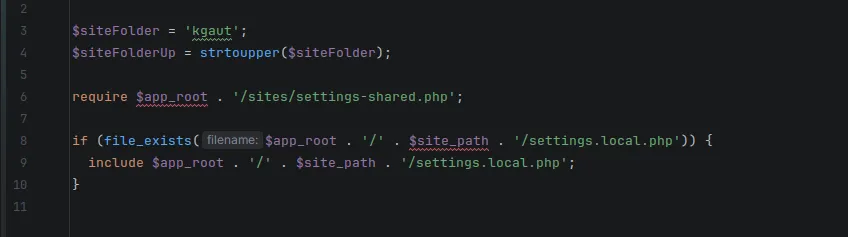
Every settings.php of every site does exactly the same thing. Four useful lines, not one more. For example, web/sites/kgaut/settings.php:
<?php

$siteFolder = 'kgaut';
$siteFolderUp = strtoupper($siteFolder);
require $app_root . '/sites/settings-shared.php';
if (file_exists($app_root . '/' . $site_path . '/settings.local.php')) {
  include $app_root . '/' . $site_path . '/settings.local.php';
}
That's it. For the dashboard site, it is strictly identical, except that $siteFolder = 'dashboard'. All the actual configuration is centralized in settings-shared.php. That file does the real work.
2.3 settings-shared.php: the heart of the factory
This file is included by all twelve settings.php files, and it configures Drupal dynamically based on the $siteFolder passed to it. Here are the interesting parts (the standard settings.php boilerplate is not shown here, but it is in the file):
Database connection from env vars:
$databases['default']['default'] = [
  'database'         => getenv($siteFolderUp . '_DB'),
  'username'         => getenv($siteFolderUp . '_USER'),
  'password'         => getenv($siteFolderUp . '_PWD'),
  'host'             => getenv($siteFolderUp . '_HOST'),
  'port'             => '3306',
  'isolation_level'  => 'READ COMMITTED',
  'driver'           => 'mysql',
  'namespace'        => 'Drupal\\mysql\\Driver\\Database\\mysql',
  'autoload'         => 'core/modules/mysql/src/Driver/Database/mysql/',
];
For the kgaut site, this reads the KGAUT_DB, KGAUT_USER, KGAUT_PWD and KGAUT_HOST environment variables. For dashboard, it's DASHBOARD_DB, and so on. A new site: add 4 lines to .env.
Private files, tmp and config sync, isolated per site:
$settings['file_private_path']     = '../files/' . $siteFolder . '/private';
$settings['file_temp_path']        = '../files/' . $siteFolder . '/tmp';
$settings['config_sync_directory'] = '../files/' . $siteFolder . '/config/sync';
Each site has its own files/<site>/{private,tmp,config,dumps} folders. No risk of one site writing into another site's files.
Optional Redis, enabled per site:
$redisKey = $siteFolderUp . '_REDIS_ENABLED';
if (getenv($redisKey) && (bool) getenv($redisKey) === TRUE) {
  $settings['redis.connection']['host']      = getenv('REDIS_HOST');
  $settings['redis.connection']['port']      = getenv('REDIS_PORT');
  $settings['redis.connection']['interface'] = getenv('REDIS_INTERFACE');
  $settings['container_yamls'][]             = DRUPAL_ROOT . '/sites/redis.services.yml';
  $settings['cache']['default']              = 'cache.backend.redis';
  $settings['cache_prefix']['default']       = $siteFolder . '_';
}
The cache prefix is derived from $siteFolder, so two sites can share the same Redis instance without collisions. Sites that need it (typically the dashboard, which gets a lot of traffic) enable Redis with DASHBOARD_REDIS_ENABLED=true in .env. Small sites that don't need it run on the standard database cache.
Sentry per site:
if (getenv($siteFolderUp . '_SENTRY_DSN')) {
  $_SERVER['SENTRY_DSN'] = getenv($siteFolderUp . '_SENTRY_DSN');
}
Each site has its own Sentry project. When kgaut.net throws an exception, I see it show up in the kgaut Sentry project, not in the dashboard one.
Environment indicator:
if (getenv('APP_ENV')) {
  $environements = [
    'dev'     => ['name' => 'dev',     'bg_color' => '#006600', 'fg_color' => '#ffffff'],
    'preprod' => ['name' => 'Staging', 'bg_color' => '#FF9900', 'fg_color' => '#000000'],
    'prod'    => ['name' => 'Prod',    'bg_color' => '#ef5350', 'fg_color' => '#000000'],
  ];
  if (isset($environements[getenv('APP_ENV')])) {
    $config['environment_indicator.indicator'] = $environements[getenv('APP_ENV')];
  }
}
Combined with the environment_indicator module, this displays a green banner in dev, orange in staging and red in production in the Drupal admin. Basic, but it avoids the classic "oops, I just made that change in production instead of locally".
Config split per environment:
$config["config_split.config_split.".getenv("APP_ENV")]["status"] = TRUE;
I have config_split.dev, config_split.preprod and config_split.prod splits that automatically enable or disable modules depending on the environment (for example devel in dev only).
And in dev only, the development services are loaded and emails are routed to Mailpit:
if (getenv('APP_ENV') && getenv('APP_ENV') === 'dev') {
  $settings['container_yamls'][] = DRUPAL_ROOT . '/sites/development.yml';
  $config['system.logging']['error_level']                = 'verbose';
  $config['symfony_mailer.settings']['default_transport'] = 'mailpit';
}
All of this lives in a single file that serves all twelve sites. When I add a new shared configuration feature (e.g. adding Sentry, routing emails), every site benefits from it automatically.
2.4 The .env file: per-site configuration
APP_ENV='dev'

KGAUT_USER="drupal11"
KGAUT_PWD="drupal11"
KGAUT_HOST="database_kgaut"
KGAUT_DB="kgaut"
KGAUT_SENTRY_DSN="https://…@sentry.io/…"

DASHBOARD_USER="drupal11"
DASHBOARD_PWD="drupal11"
DASHBOARD_HOST="database_dashboard"
DASHBOARD_DB="dashboard"
DASHBOARD_REDIS_ENABLED=true
DASHBOARD_SENTRY_DSN="https://…@sentry.io/…"

REDIS_HOST=redis
REDIS_PORT=6379
REDIS_INTERFACE=PhpRedis
In dev, all sites share the same drupal11/drupal11 MySQL user. In production, I have a separate MySQL user per database, each with its own password, for stronger isolation.
2.5 Drush aliases: targeting each site from the CLI
To target a site from the command line, Drush uses aliases. I have one drush/sites/<site>.site.yml file per site, for example drush/sites/kgaut.site.yml:
dev:
  root: /app
  uri: https://kgaut.lndo.site
2.6 Custom modules: one per site, one shared
The module layout is straightforward:
web/modules/<site>/: a module specific to each site, containing its specific business logic (for exampleweb/modules/dashboard/holds the code of my project tracking site,web/modules/dronestagram/holds the module for my drone photos site).
Same logic on the theme side: each site has its own theme.
3. The Lando setup for local development
To run the twelve sites locally, I use Lando. It's a layer on top of Docker that makes declaring dev stacks much simpler, with a readable YAML configuration and ready-made "recipes" (Drupal 11 included).
The alternative would be a hand-written docker-compose.yml. On top of that, Lando gives me:
- An automatic proxy that resolves
.lndo.sitedomains with valid HTTPS (a self-signed certificate installed in the system store) - A "tooling" concept that defines high-level commands (
lando drush,lando phpstan…)
3.1 The .lando.yml file: the full stack
Here is the skeleton of my .lando.yml (I shortened the database services part):
name: uzinasit
recipe: drupal11
config:
  webroot: web

proxy:
  appserver:
    - kgaut.lndo.site
    - dashboard.lndo.site
    - drone.lndo.site
    ...
  mailpit:
    - 'mail.lndo.site:8025'
  pma:
    - pma.lndo.site

services:

  node:
    type: 'node:22'
    ssl: true
    sslExpose: true
    portforward: 4444

  mailpit:
    api: 3
    type: lando
    services:
      image: axllent/mailpit
      ports: [8025, 1025]
      environment:
        MP_MAX_MESSAGES: 5000
        MP_SMTP_AUTH_ACCEPT_ANY: 1

  cache:
    type: redis
    persist: true
  redis:
    type: 'redis:5'

  pma:
    type: phpmyadmin
    hosts:
      - database_kgaut
      - database_dashboard
      - database_drone
      # … all 12 of them

  database_kgaut:
    type: 'mariadb:10.11'
    portforward: true
    creds: { user: drupal11, password: drupal11, database: kgaut }
  database_dashboard:
    type: 'mariadb:10.11'
    portforward: true
    creds: { user: drupal11, password: drupal11, database: dashboard }
  # … etc, one entry per site
Things worth noting:
- Node is a separate service, used for front-end builds (SASS, gulp...)
- Mailpit captures every email sent in dev, viewable at
mail.lndo.site:8025. - One MariaDB 10.11 database per site.
- PhpMyAdmin gives centralized access to the twelve databases at
pma.lndo.site.
3.2 Why twelve separate databases rather than a single one with prefixes?
It's an architectural choice. Drupal can work with table prefixes (prefix in $databases), so a single MariaDB instance could be shared. But I chose one instance per site, for these reasons:
- Consistency with production: in production each site has its own database, with its own MySQL user. Doing the same locally avoids surprises.
- Full isolation:
drop database kgaut;will never touch the dashboard. - Simple dumps: one
.sql.gzfile per site, imported without having to think about prefixes. The same dump works locally and in production. - Performance: nothing is shared, so there is no contention. Pausing a dump only affects the site concerned.
3.3 Starting the stack
Once .env is filled in:
lando startAnd there you go: twelve Drupal sites available over HTTPS at https://kgaut.lndo.site, https://dashboard.lndo.site, and so on. Adding a new site won't require touching this config: the drush uzc command (covered further down) handles it automatically.
4. Custom scripts: the real day-to-day productivity gain
Lando provides a tooling section to define high-level commands. All the commands in the table below are run as lando <commande>, from the project root:
| Lando command | What it does |
|---|---|
lando front:build | npm i + theme builds (I could split them up, but I chose simplicity) |
lando db-export-all | Timestamped SQL dump of each database, in files/<site>/dumps/ |
lando drush-all | Runs the same Drush command on all 12 sites, sequentially |
lando db-get-all | Fetches the latest production dump of every site over SSH |
lando db-import-all | Imports locally the latest .sql.gz dump of every site |
lando db-sync <site> | db-get + db-import + drush deploy chained for a single site |
lando db-sync-all | Same thing, but for all detected sites |
lando phpstan | PHPStan analysis on the custom modules |
lando phpcs | PHPCS analysis |
lando rector | Rector (guided automated refactoring) |
lando phpunit | PHPUnit |
lando grumphp | Full suite: CS + PHPStan + composer check (used as a pre-commit hook) |
4.1 db-sync: pulling the production database locally
A simple:
lando db-sync dashboard
And 30 seconds later, my local dashboard database contains the latest production dump, and drush deploy has run. I'm in sync with production, ready to develop.
The scripts/db-sync.sh script is deliberately short: it orchestrates two simpler scripts:
#!/usr/bin/env bash
set -euo pipefail

SITE="${1:-}"
DRY_RUN=false
NO_DEPLOY=false

# parse the --dry-run and --no-deploy flags
for arg in "${@:2}"; do
  case "$arg" in
    --dry-run)   DRY_RUN=true ;;
    --no-deploy) NO_DEPLOY=true ;;
  esac
done

GET_SCRIPT="./scripts/db-get.sh"
IMPORT_SCRIPT="./scripts/db-import.sh"

echo "--- Récupération du dump ---"
"$GET_SCRIPT" "$SITE" || echo "Pas de nouveau dump distant, on utilise le local."

echo "--- Import du dump ---"
IMPORT_ARGS=("$SITE")
[[ "$NO_DEPLOY" == true ]] && IMPORT_ARGS+=(--no-deploy)
"$IMPORT_SCRIPT" "${IMPORT_ARGS[@]}"
The two building blocks it chains together:
db-get.sh connects to my server over SSH, finds the most recent .sql.gz dump in the remote files/<site>/dumps/ folder, and copies it locally with rsync (falling back to scp if rsync is not available):
REMOTE_BASE="/home/uzinasit/public_html/files/${SITE}/dumps"
LOCAL_BASE="./files/${SITE}/dumps"

LATEST_REMOTE_FILE=$(ssh "${REMOTE_USER}@${REMOTE_HOST}" \
  "ls -1t ${REMOTE_BASE}/*.sql.gz 2>/dev/null | head -n1")

rsync -avz --progress \
  "${REMOTE_USER}@${REMOTE_HOST}:${LATEST_REMOTE_FILE}" \
  "${LOCAL_BASE}/"
db-import.sh imports the .sql.gz straight through mysql without extracting it first (zcat | mysql), then runs drush deploy:
MYSQL_CMD=$(drush "@$SITE" sql:connect 2>/dev/null)
zcat "$LATEST_FILE" | eval "${MYSQL_CMD} --skip-ssl"

echo "Dump importé pour $SITE"
if [[ "$NO_DEPLOY" == true ]]; then
  echo "Drush deploy ignoré (--no-deploy)"
else
  drush "@$SITE" deploy
fi
The drush deploy step matters: it imports the local Drupal config (config:import), runs the update hooks (updatedb) and rebuilds the cache. After that, the local site matches exactly the state of the current code + the production data.
The --dry-run (check without doing anything) and --no-deploy (import without running drush deploy) flags are there for edge cases, typically when I want the production database but without re-importing the "dev" config split.
4.2 db-sync-all: the big reset
If I come back from a week of vacation and want to reset my whole local factory, I run:
lando db-sync-all
The script discovers the list of sites on its own by scanning drush/sites/*.site.yml, and calls db-sync.sh for each of them:
mapfile -t ALIAS_FILES < <(printf '%s\n' "${DRUSH_SITES_DIR}"/*.site.yml | sort)

SITES=()
for f in "${ALIAS_FILES[@]}"; do
  alias_name="${$(basename -- "$f")%.site.yml}"
  case "$alias_name" in
    self|uzinasit|mbc) continue ;;  # skip the technical ones
    *) SITES+=("$alias_name") ;;
  esac
done

echo "Sites détectés (${#SITES[@]}): ${SITES[*]}"

for site in "${SITES[@]}"; do
  if "$SYNC_ONE_SCRIPT" "$site" "${EXTRA_ARGS[@]}"; then
    SUCCESS=$((SUCCESS + 1))
  else
    FAILED=$((FAILED + 1))
  fi
done

echo "Résumé sync-all: ${SUCCESS} succès, ${FAILED} échec(s)."
When I add a new site with drush uzc, its drush/sites/<site>.site.yml alias is created automatically → it is automatically included in the next db-sync-all. No list to maintain anywhere.
5. Adding a new site with drush uzc
Adding a new site to Uzinasit requires changes to seven files, in the right order:
web/sites/sites.php(hostname → folder mapping)drush/sites/<alias>.site.yml(Drush alias).lando.yml(MariaDB service, proxy, PMA, tooling…).env(4 variables)files/<alias>/(folder creation)web/sites/<alias>/(settings.php + services.yml).gitlab-ci.yml(adding it to the matrix)
I did it by hand a few times and got fed up with it: things forgotten, time wasted...
So I wrote a Drush command that does all of this automatically. It lives in drush/Commands/uzinasit/CreateCommand.php and is called drush uzinasit:create, aliased as drush uzc.
The interactive flow:
$ drush uzc
Enter the site alias (e.g., ulm) [ulm]: monnouveausite
Enter the local URL (must end with .lndo.site) [monnouveausite.lndo.site]:
Enter the production URL (without the procol) [monnouveausite.uzinasit.kgaut.net]: monnouveausite.kgaut.net

 Site Information
 ────────────────
 ┌────────────────┬───────────────────────────────────┐
 │ Parameter      │ Value                             │
 ├────────────────┼───────────────────────────────────┤
 │ Site Alias     │ monnouveausite                    │
 │ Local URL      │ monnouveausite.lndo.site          │
 │ Production URL │ monnouveausite.kgaut.net          │
 └────────────────┴───────────────────────────────────┘

 Do you want to create this site? (yes/no) [yes]:

Updating sites.php... ✅ sites.php updated.
Creating Drush alias file... ✅ Drush alias file created.
Updating .lando.yml... ✅ .lando.yml updated.
Updating .env file... ✅ .env file updated.
Creating site files directory... ✅ Site files directory created.
Creating site configuration directory... ✅ Site configuration directory created and settings.php updated.
Updating .gitlab-ci.yml... ✅ .gitlab-ci.yml updated with new site alias.

[OK] Site 'monnouveausite' has been successfully created!
Under the hood, the command uses Symfony\Component\Yaml\Yaml to read and write .lando.yml and .gitlab-ci.yml cleanly. Here is the excerpt that edits .lando.yml to add the MariaDB service and the related tooling:
$landoYml = Yaml::parseFile($landoYmlPath);

// Add the local URL to the appserver proxy
$landoYml['proxy']['appserver'][] = $localUrl;

// Add a new MariaDB service for this site
$dbServiceName = "database_$alias";
$landoYml['services'][$dbServiceName] = [
  'type'        => 'mariadb:10.11',
  'portforward' => true,
  'creds'       => [
    'user'     => 'drupal11',
    'password' => 'drupal11',
    'database' => $alias,
  ],
];

// Register the new database in PhpMyAdmin
$landoYml['services']['pma']['hosts'][] = $dbServiceName;

// Add the site to every relevant tooling entry
$landoYml['tooling']['db-export-all']['cmd'][] = [
  $dbServiceName => "/helpers/sql-export.sh /app/files/$alias/dumps/`date +%Y-%m-%d_%H-%M-%S`-$alias.sql"
];
$landoYml['tooling']['drush-all']['cmd'][]     = ["drush @$alias"];
$landoYml['tooling']['db-get-all']['cmd'][]    = "./scripts/db-get.sh $alias";
$landoYml['tooling']['db-import-all']['cmd'][] = "./scripts/db-import.sh $alias";

file_put_contents($landoYmlPath, Yaml::dump($landoYml, 10, 2));
And updating the GitLab CI matrix relies on a regex over the list of sites:
if (preg_match('/- SITE: \[(.*?)\]/', $content, $matches)) {
  $sitesList = $matches[1];
  $sites = array_map('trim', explode(',', $sitesList));

  if (!in_array("'$alias'", $sites)) {
    $sites[] = "'$alias'";
    $newSitesList = implode(', ', $sites);
    $newContent = preg_replace('/- SITE: \[(.*?)\]/', "- SITE: [$newSitesList]", $content);
    file_put_contents($gitlabCiPath, $newContent);
  }
}
For the two folders to create (files/<alias>/ and web/sites/<alias>/), the command copies scaffolding templates from drush/Commands/uzinasit/scaffolding/:
$sourceDir = dirname(__FILE__) . "/scaffolding/sites_SITE";
$targetDir = "$projectRoot/web/sites/$alias";
$fs->mirror($sourceDir, $targetDir);

// Replace the placeholder in the scaffolded settings.php
$content = file_get_contents("$targetDir/settings.php");
$content = str_replace("\$siteFolder = 'ulm';", "\$siteFolder = '$alias';", $content);
file_put_contents("$targetDir/settings.php", $content);
Once the command has finished, all I have left to do is:
lando restart # to pick up the new DBAnd that's it. Site added in two minutes.
6. Deployment: GitLab CI and the matrix over the sites
All the code lives in a GitLab repository (I self-host my GitLab, but it would work the same way on gitlab.com). Deployment is driven by .gitlab-ci.yml, which relies on my own templates shared across several projects: kgaut/gitlab-ci-templates.
6.1 Pipeline structure
variables:
  CI_TEMPLATE_VERSION: &CI_TEMPLATE_VERSION 0.4.21
  QA_DOCKER_IMAGE: wodby/drupal-php:8.3-dev
  DAYS_DUMP_TO_KEEP: 7
  SENTRY_ORG: 'kgautnet'

include:
  - project: kgaut/gitlab-ci-templates
    ref: *CI_TEMPLATE_VERSION
    file:
      - '/templates/generic/stages-variables-extends.yml'
      - '/templates/drupal/backup.yml'
      - '/templates/drupal/deploy.yml'
      - '/templates/generic/deploy-tracking.yml'
      - '/templates/qa/qa.yml'
      - '/templates/qa/phpstan.yml'
      - '/templates/qa/phpcs.yml'
      - '/templates/qa/phpunit.yml'
My external templates handle all the boilerplate (SSH, stages, naming conventions). The pipeline has 5 stages: QA → predeploy → deploy → postdeploy → scheduled.
6.2 The matrix: parallel jobs, per site
This is the core mechanism that makes it possible to parallelize across sites:
.drush-aliases:
  parallel:
    matrix:
      - SITE: ['kgaut', 'dashboard', ...]

.sentry-sites:
  parallel:
    matrix:
      - SITE: ['kgaut', 'dashboard', ...]
Any job that extends: .drush-aliases is automatically run once per site, in parallel, with the $SITE variable taking each value. So prod:deploy-config, prod:clear-cache, prod:postdeploy:backup, prod:scheduled-backup: all these steps run in parallel across 12 jobs (one per site).
And when I add a new site with drush uzc, it is automatically added to this matrix (the Drush command edits .gitlab-ci.yml on its own, as we just saw).
6.3 The key jobs
QA (QA stage) runs on every merge request and every push to main:
phpstan: static analysis on the custom modulesphpcs: Drupal coding standardsphpunit: unit tests
assets:generation (predeploy stage) compiles the CSS and JS on a Node 22 runner:
assets:generation:
  image: node:22
  stage: predeploy
  script:
    - npm i
    - npm run sass-build-kgaut
    - npm run sass-build-wam
    - npm run sass-build-daash
    - npm i --prefix ./web/libraries/
    - npm i --prefix ./web/themes/custom/yfdev
    - npm run build --prefix ./web/themes/custom/yfdev
    - ...
  artifacts:
    paths:
      - web/themes/kgaut_2024/css
      - web/themes/daash/css
      - web/themes/wam_theme/css
      - web/themes/custom/yfdev/dist
      - web/libraries/node_modules
      - ...
    expire_in: 20 minutes
The generated CSS is published as artifacts (20-minute lifetime, just long enough for the next job).
assets:deploy (deploy stage) pushes the compiled assets over SSH with rsync:
assets:deploy:
  image: alpine
  stage: deploy
  before_script:
    - apk update && apk add openssh git curl rsync
  script:
    - rsync -avhzi --delete --stats web/themes/kgaut_2024/css \
        -e "ssh -p $SSH_PORT" $SSH_USER@$SSH_HOST:$PROJECT_ROOT/web/themes/kgaut_2024
    - rsync -avhzi --delete --stats web/themes/daash/css \
        -e "ssh -p $SSH_PORT" $SSH_USER@$SSH_HOST:$PROJECT_ROOT/web/themes/daash
    # … etc
  needs: [assets:generation, prod:deploy]
prod:deploy (deploy stage) is where the PHP code gets deployed. This job connects to production over SSH and runs scripts/deploy-code.sh:
.deploy:
  stage: deploy
  extends: [.ssh]
  script:
    - $SSH_CHAIN 'bash -s' < ./scripts/deploy-code.sh \
        $PROJECT_ROOT $DRUPAL_SITE_PATH $DRUSH_BIN \
        $CI_ENVIRONMENT_NAME $CI_PIPELINE_IID $CI_COMMIT_REF_NAME
The deploy-code.sh script is deliberately minimalist:
#!/bin/bash
set -e

PROJECT_ROOT="$1"
CI_ENVIRONMENT_NAME="$4"
CI_PIPELINE_IID="$5"
CI_COMMIT_REF_NAME="$6"

cd "$PROJECT_ROOT"

# Make the settings folders writable during the update
chmod +w "$PROJECT_ROOT/web/sites/default"
chmod +w "$PROJECT_ROOT/web/sites/default/settings.php"
chmod +w "$PROJECT_ROOT/web/sites/monboncoin"
chmod +w "$PROJECT_ROOT/web/sites/monboncoin/settings.php"
# … for each site

if [ $CI_ENVIRONMENT_NAME = "prod" ]; then
  TAG="$6"
  git fetch --tags
  git checkout "$TAG"
else
  git fetch --all
  git reset --hard origin/$CI_COMMIT_REF_NAME
fi

composer install --no-dev

# Restore the read-only permissions
chmod ugo-w "$PROJECT_ROOT/web/sites/default"
chmod ugo-w "$PROJECT_ROOT/web/sites/default/settings.php"
# …
In production, we deploy a tag. In staging, the current branch. And composer install --no-dev ensures we run without the dev dependencies (phpstan, phpcs…). Everything else (the Drupal config to import, the caches to clear, the backups) is delegated to the GitLab jobs that follow.
prod:deploy-config runs drush deploy (which does updatedb + config:import + cache:rebuild) on each site in parallel:
prod:deploy-config:
  extends: [.prod, .ssh, .drush-aliases]
  script:
    - $SSH_CHAIN 'bash -s' < ./scripts/deploy-config.sh \
        $PROJECT_ROOT $DRUPAL_SITE_PATH $DRUSH_BIN \
        $CI_ENVIRONMENT_NAME $CI_PIPELINE_IID \
        $CI_COMMIT_REF_NAME "@$SITE.main" $SITE
  needs: [prod:deploy]
prod:clear-cache: drush cr on each site, in parallel:
prod:clear-cache:
  extends: [.prod, .drush-aliases, .ssh]
  stage: postdeploy
  script:
    - $SSH_CHAIN "$PROJECT_ROOT/$DRUSH_BIN $DRUSH_ALIAS cr"
prod:postdeploy:backup: a timestamped SQL dump of each site right after the deployment. It makes rolling back easy if a release breaks something:
prod:postdeploy:backup:
  extends: [.ssh, .backup, .drush-aliases, .prod]
  script:
    - $SSH_CHAIN "$PROJECT_ROOT/$DRUSH_BIN @$SITE.main sql-dump \
        | gzip -9 > $PROJECT_ROOT/files/$SITE/dumps/`date +%Y-%m-%d_%H-%M-%S`-$SITE-post-$CI_COMMIT_REF_NAME.sql.gz"
prod:scheduled-backup runs on a GitLab schedule (every night). Same thing, but as a scheduled job.
prod:scheduled-clean purges dumps older than 7 days:
script:
  - $SSH_CHAIN "find $PROJECT_ROOT/files/$SITE/dumps/ \
      -type f -mtime +$DAYS_DUMP_TO_KEEP -name '*.sql.gz' -delete"
prod:sentry-release creates a Sentry release per site with the associated commits:
prod:sentry-release:
  variables:
    RELEASE: "$CI_COMMIT_TAG"
    SENTRY_PROJECT: "$SITE"
  extends: [.sentry-sites, .prod, .sentry-release]
At the end of the pipeline, I have:
- The code deployed on all 12 sites
- The CSS and JS recompiled and rsynced
- The Drupal config imported on each site
- The caches cleared
- A pre-deploy SQL dump and a post-deploy SQL dump per site
- A Sentry release per site with the commits associated with this version
And all of this runs in about 5 to 10 minutes depending on the size of the update, thanks to the matrix parallelization.
7. The Drupal update workflow
This is the main selling point of this architecture. Let's look at how a Drupal core update actually goes:
cd uzinasit
composer update drupal/core --with-dependencies
lando drush-all updb -y # database update
lando drush-all cex # config export
# Test with unit tests and manual checks
git commit -am "feat(core): update Drupal 11.x.y"
git tag x.y.z
git push
git push --tags
And the CI does the rest: QA, asset build, code deployment to production (a single composer install), drush deploy as a matrix across the 12 sites, cache clearing, post-deploy backup, Sentry releases. All in less than 10 minutes, in parallel.
And since there is a single composer.lock, I have an absolute guarantee that my 12 sites run exactly the same version of Drupal core and the same contrib modules. No more drift between sites.
That's what I was after. Routine maintenance → close to zero time. The last time a critical Drupal core vulnerability was published, I applied the update in 5 minutes. Without this architecture, it would have eaten half a day.
Same for contrib modules: composer require drupal/un_module makes the module available to all 12 sites. It's then up to each site to enable that module or not (through its core.extension.yml in files/<site>/config/sync/).
To conclude
I'm very happy with this infrastructure:
- Setting up a new site is now very quick
- My sites are now always up to date
- Simplified backups for all sites
A few limitations:
- When I change something on one site, all 12 sites get deployed, backed up, caches cleared... I might think about a way to limit deployment to a single site when it isn't a module / library update
- Obviously, I don't host any client sites on this infrastructure.
Next lead I'd like to explore: Drupal recipes, to scaffold a site with a predefined set of modules (news, blog, brochure site...)
Feel free to reach out if you have any suggestions or questions

Written by Kevin Gautreau — freelance PHP/Drupal developer & trainer in Auvergne, France. get in touch
Comments (0)